Skip to content

We build the operating system behind modern education.

Manecia Technologies builds cloud software for schools and education institutions. Our systems connect academics, administration, finance, people and communication, so every team works from the same record.

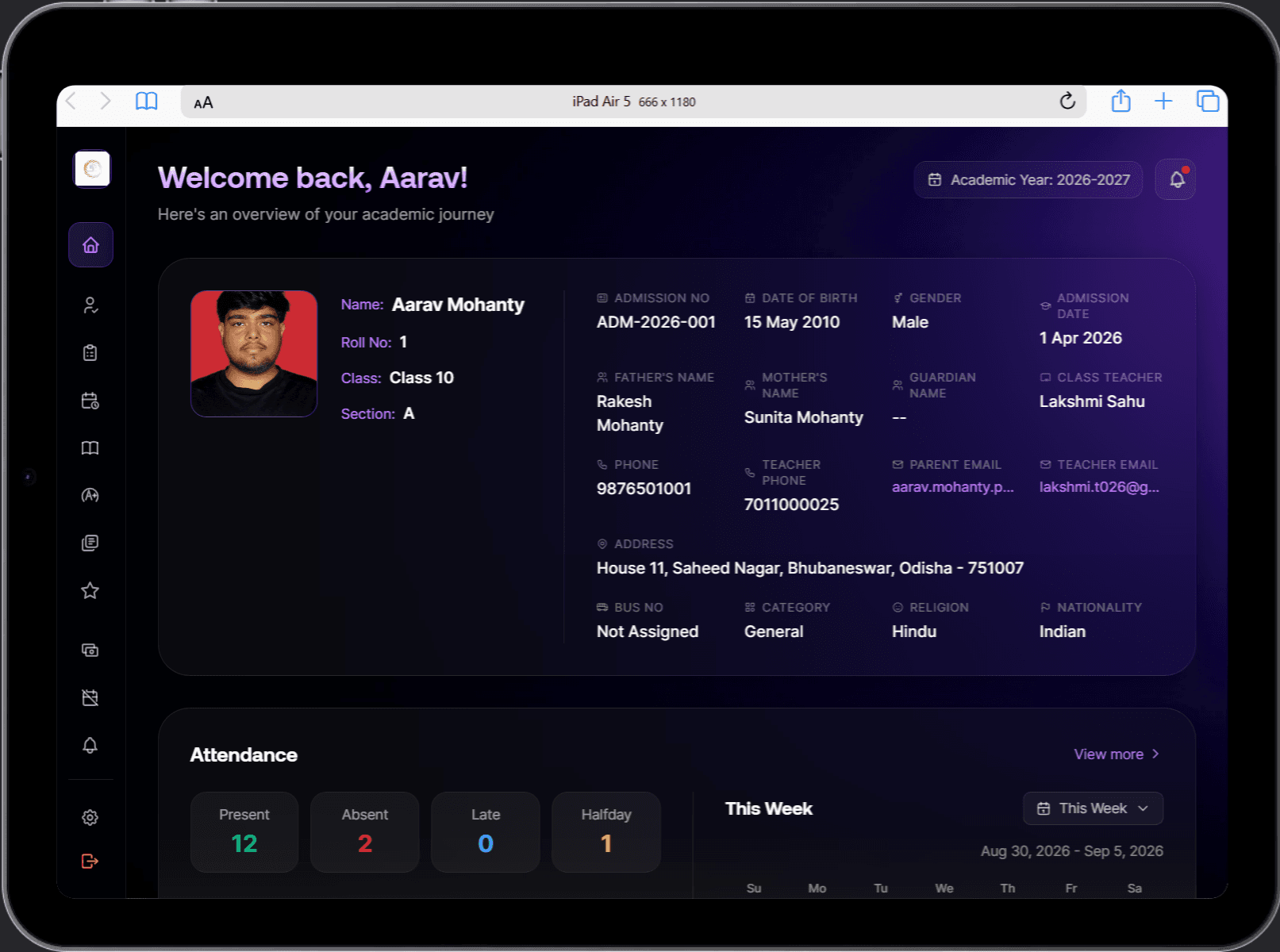
Manecia ERP student dashboard with the student's profile, guardian and class teacher details, and attendance counts for the week
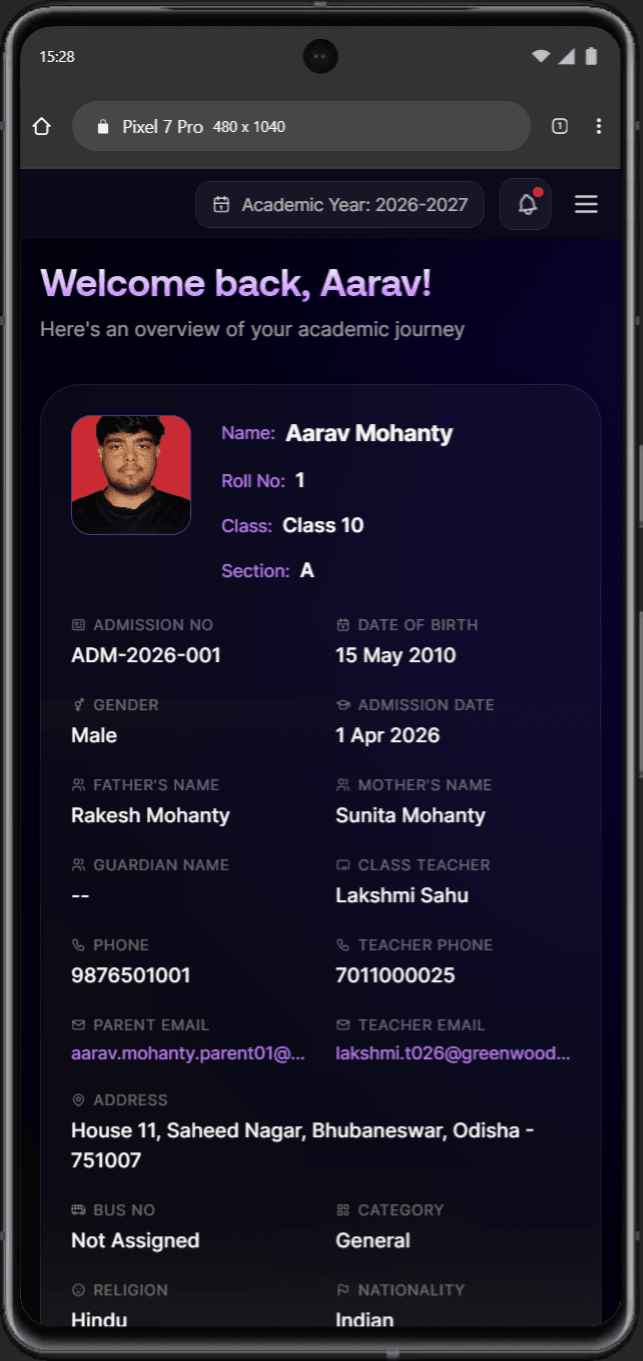
Student dashboard on a phone with admission number, date of birth, guardian names and class teacher contact

A workspace for each student, family and teacher, built from the same records the office uses.

Explore Dashboard

Who we are

An education technology company building the systems institutions run on.

We design, build and implement software for the operational side of education: the admissions desk, the finance office, the staffroom, the transport team and the families they serve.

Most institutions run that work across registers, spreadsheets, messaging groups and separate portals. We replace the gaps between them with one connected system, and stay involved through setup, data migration, training and support.

More about the company
Based in
Meerut, Uttar Pradesh, India
Flagship product
Manecia ERP
What we deliver
Software, implementation and support

What we build

Software built on one institutional record.

Manecia software is built in three connected layers. When a record changes in one place, every team that depends on it sees the change.

  1. Workspaces

    What each person sees when they sign in, with access matched to their responsibility.

    • Leadership
    • Office
    • Finance
    • Teachers
    • Students
    • Parents
  2. Workflows

    The daily work that changes those records, with approvals and exceptions handled inside the system.

    • Admissions
    • Attendance
    • Examinations
    • Collections
    • Payroll
    • Leave
    • Transport
  3. Records

    The institution's information, recorded once and shared by every workflow and workspace.

    • Students & guardians
    • Staff
    • Classes & subjects
    • Fee ledgers
    • Vehicles & routes

Manecia ERP ยท Flagship product

The operating platform for modern educational institutions.

Admissions, academics, attendance, fees, payroll, transport and student care run in one connected system instead of a separate tool for each department.

Explore Manecia ERP

When work finishes in one place, it continues in the next.

  • Admissionscontinues inStudent record

    An approved applicant becomes a student with a roll number, class, section and portal login.

  • Attendancecontinues inPayroll

    Present days, approved leave and half-days set each staff member's payable days.

  • Transportcontinues inFees

    Assigning a bus route adds the transport fee to the student's dues.

  • Examinationscontinues inFamily portal

    Published results arrive with a subject breakdown and a report card to download.

  • Attendancecontinues inParents

    An absence reaches the family the same morning.

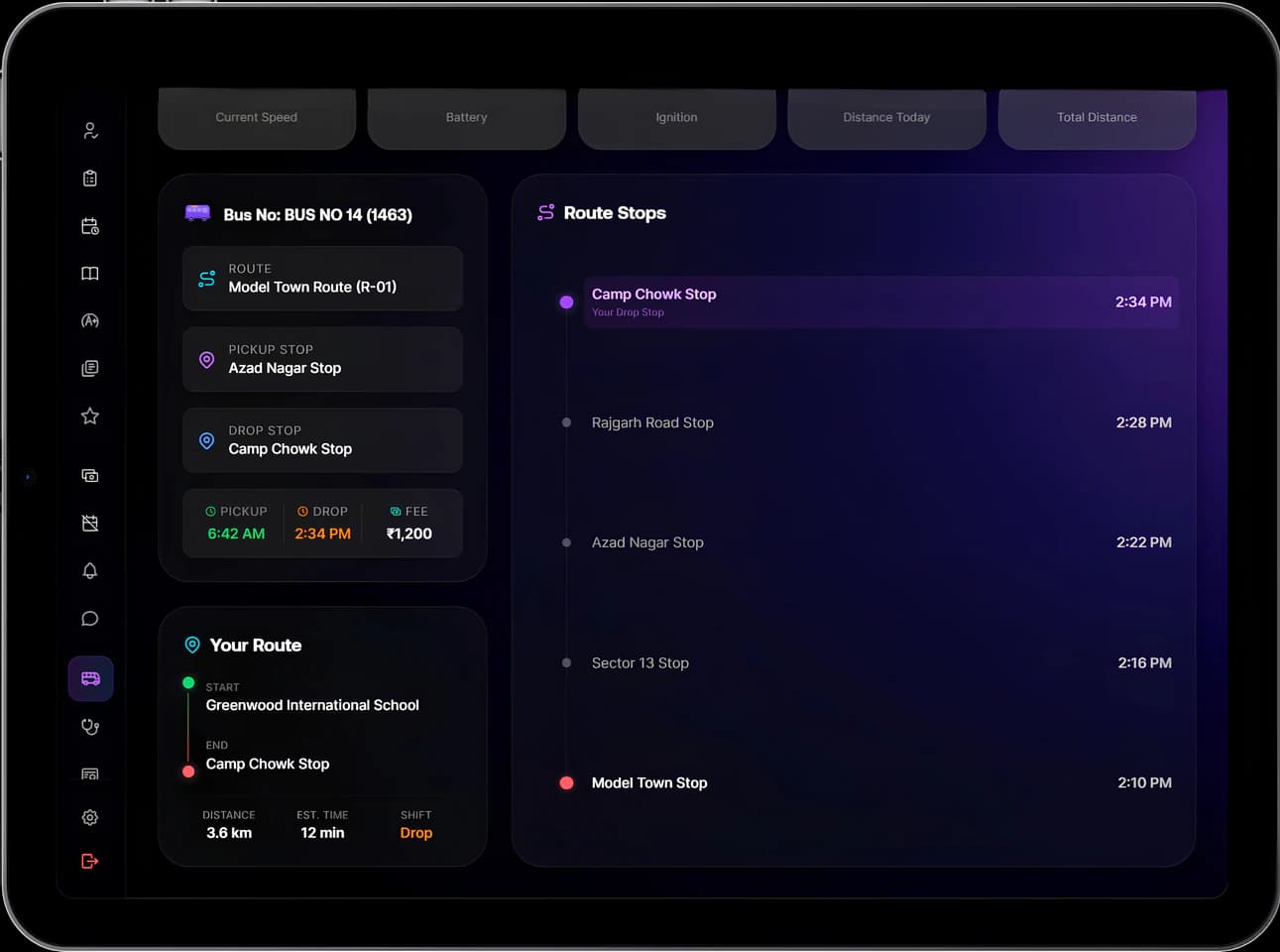
Bus route with the route name, pickup and drop stops and times, distance and the ordered list of stops with timings

Bus route

Bus route with the route name, pickup and drop stops and times, distance and the ordered list of stops with timings
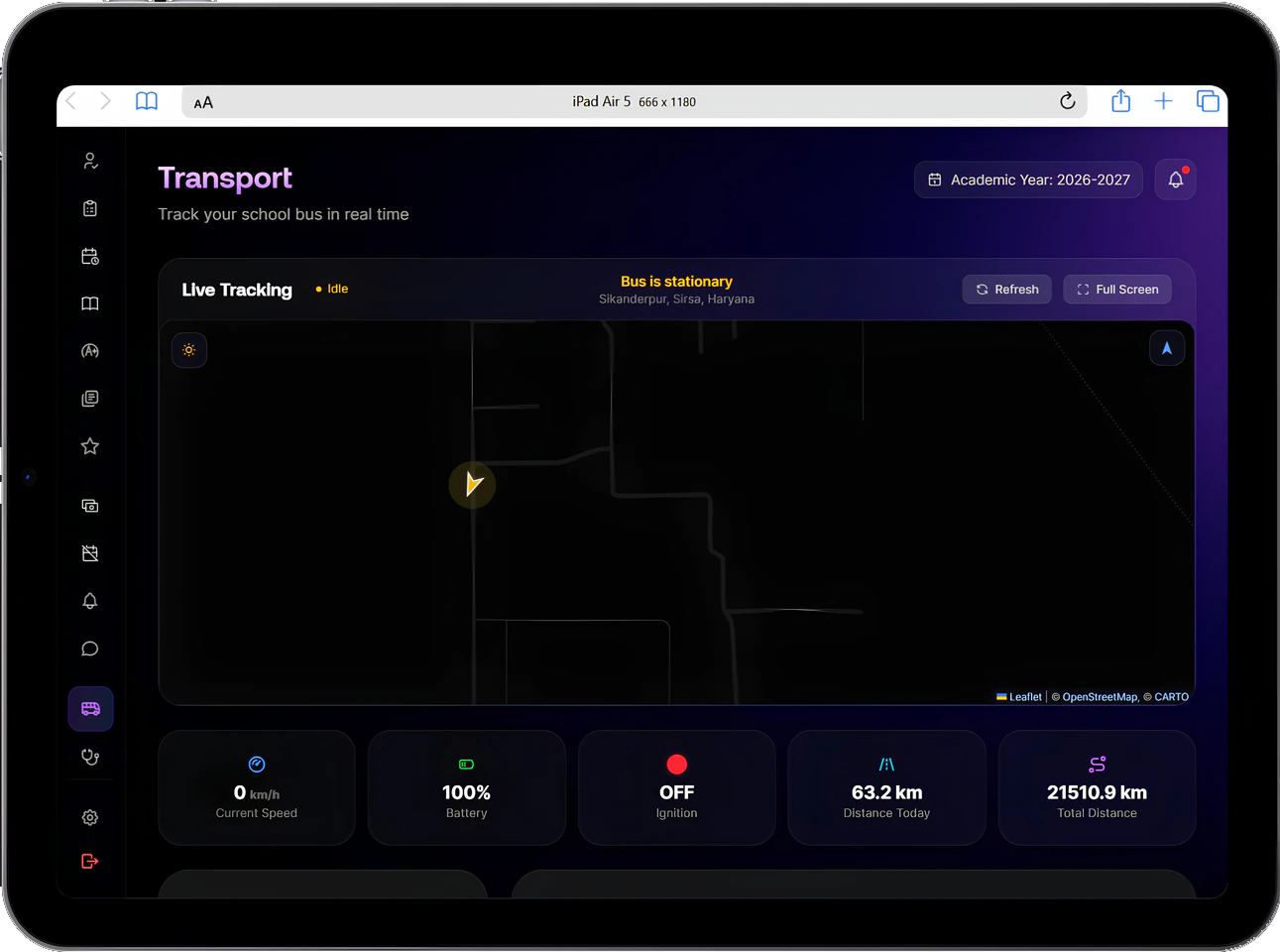
Live school bus tracking map with the bus location and status, current speed, battery, ignition, distance today and total distance

Live bus tracking

Live school bus tracking map with the bus location and status, current speed, battery, ignition, distance today and total distance
Live bus tracking, and a student's route with pickup and drop stops and timings.

Modules

Deep enough for each department. Connected across all of them.

Each module handles the approvals, exceptions and records its department depends on, and shares them with the rest of the institution.

Enrolment

Portals & communication

Inside Manecia ERP

What each team sees when they sign in.

Manecia ERP on laptops, tablets and phones. Select any device to see its screen larger.

Students, families & teachers

Each person opens a workspace built around their day.

Students and parents see profile details, attendance, fees and results. Teachers see their classes, their own record and their payslip. All of it comes from the records the office keeps.

Student, family & teacher portals
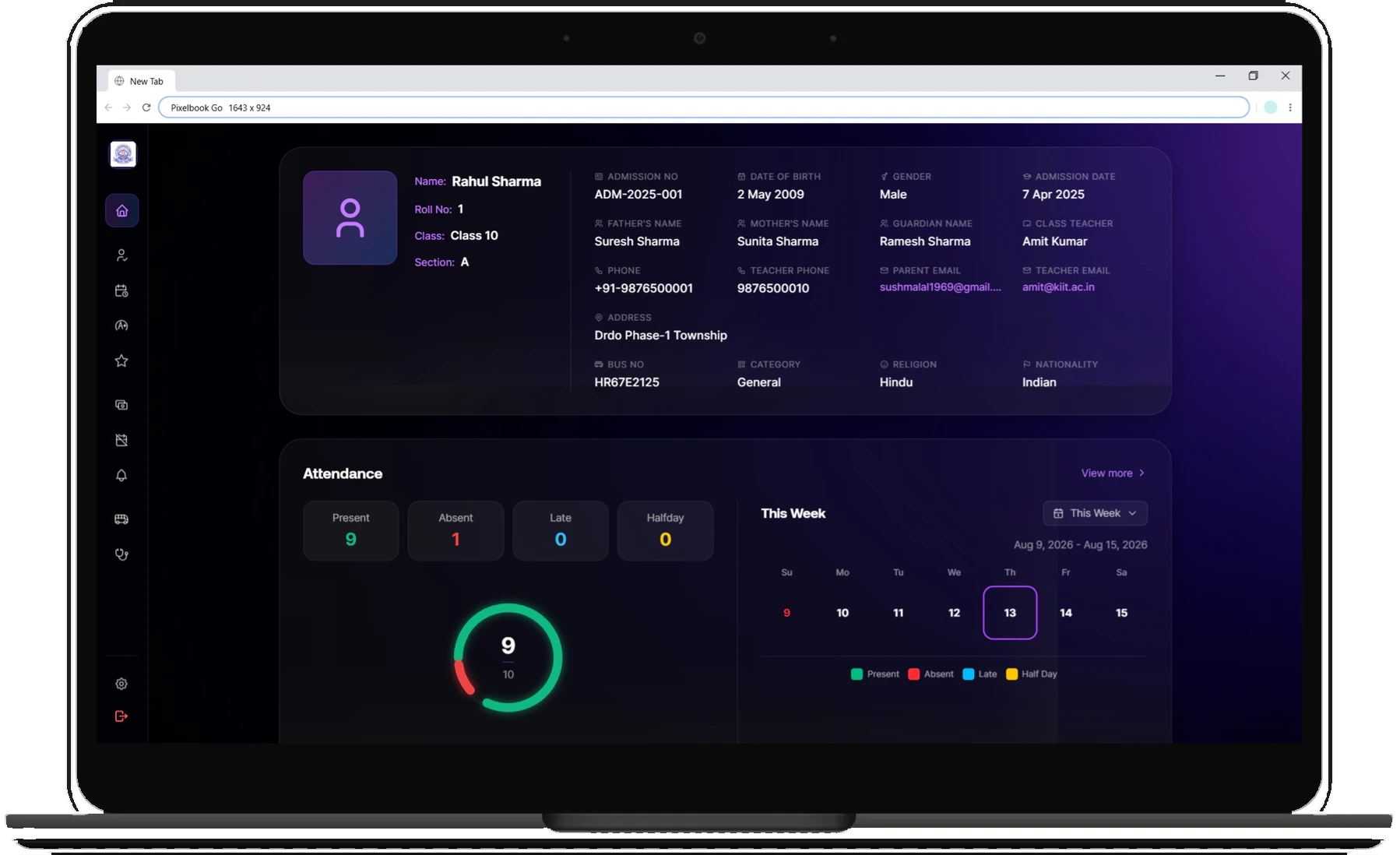
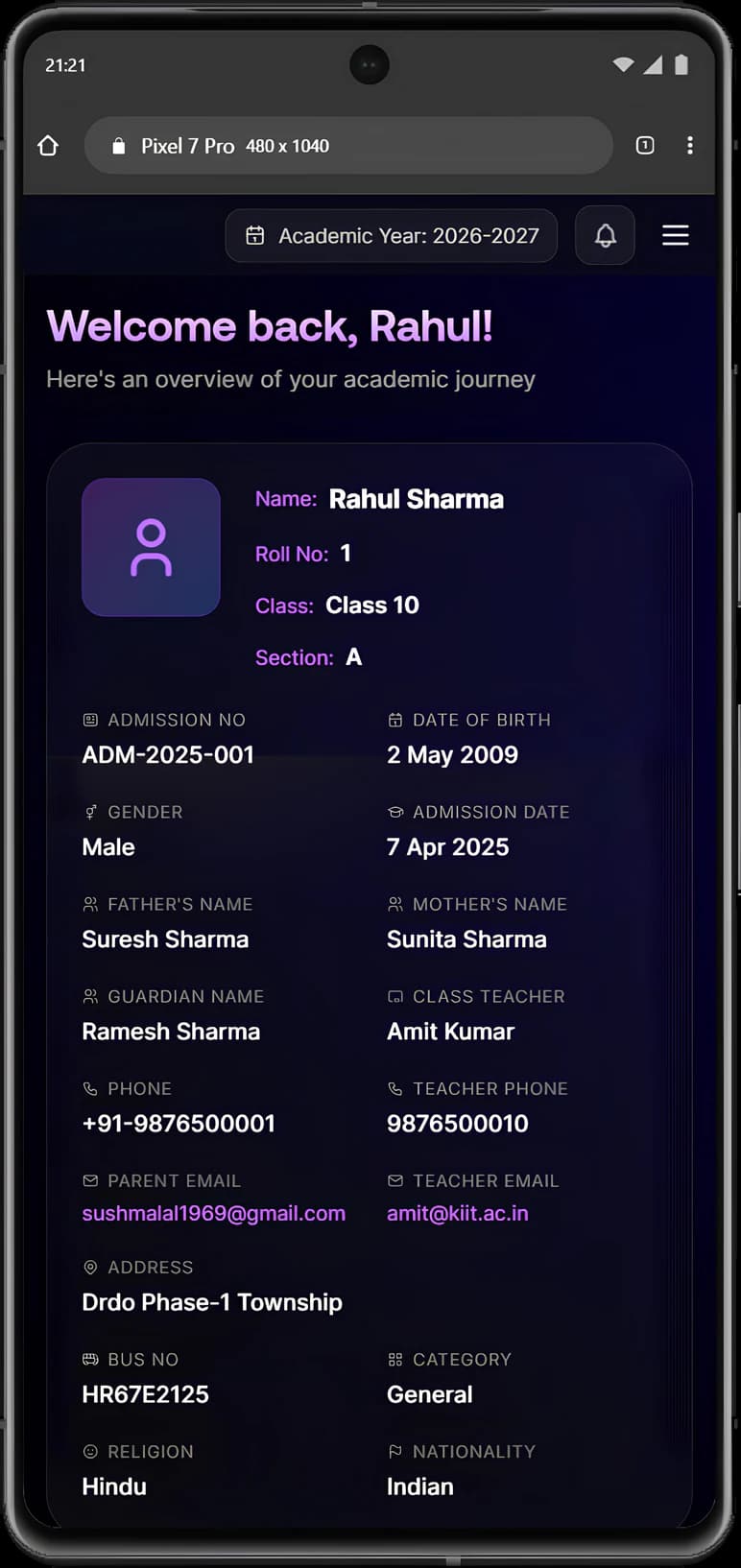
Manecia ERP student dashboard in a laptop browser, with the student's profile, guardian and class teacher details, and attendance counts for the week

Student dashboard on a laptop

Manecia ERP student dashboard in a laptop browser, with the student's profile, guardian and class teacher details, and attendance counts for the week
Student dashboard on a phone with the student's admission number, date of birth, parents' names and class teacher contact

Student dashboard on a phone

Student dashboard on a phone with the student's admission number, date of birth, parents' names and class teacher contact
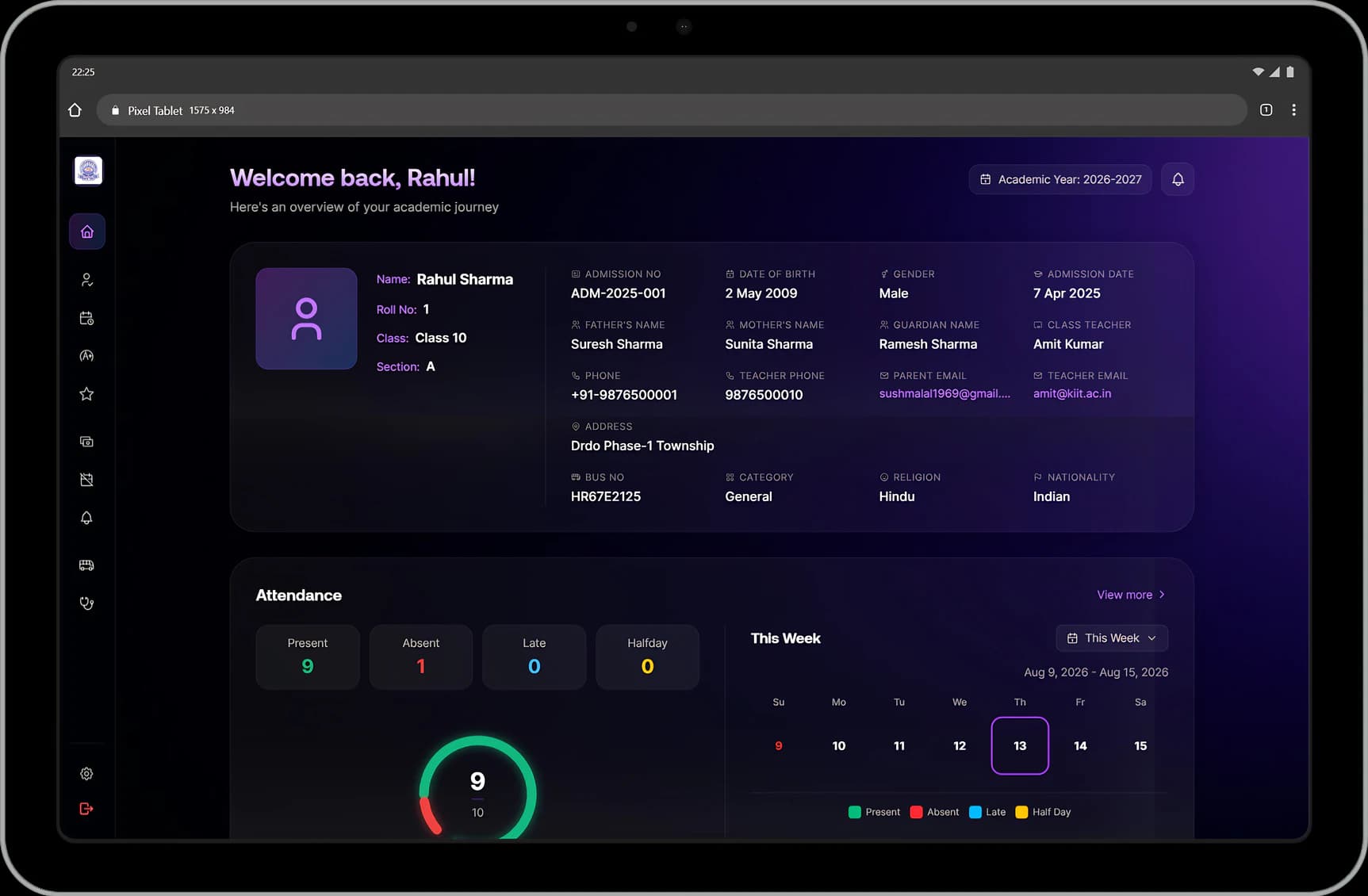
Student dashboard on a tablet with a welcome message, the student's profile details and this week's attendance

Student dashboard on a tablet

Student dashboard on a tablet with a welcome message, the student's profile details and this week's attendance
The student dashboard on a laptop, a phone and a tablet: profile, guardian details and this week's attendance.

Finance

What is due, paid and overdue, for every student.

The finance office works from a live fee ledger with part payments, late fees and receipts, and payroll takes payable days straight from attendance.

Fees & collections
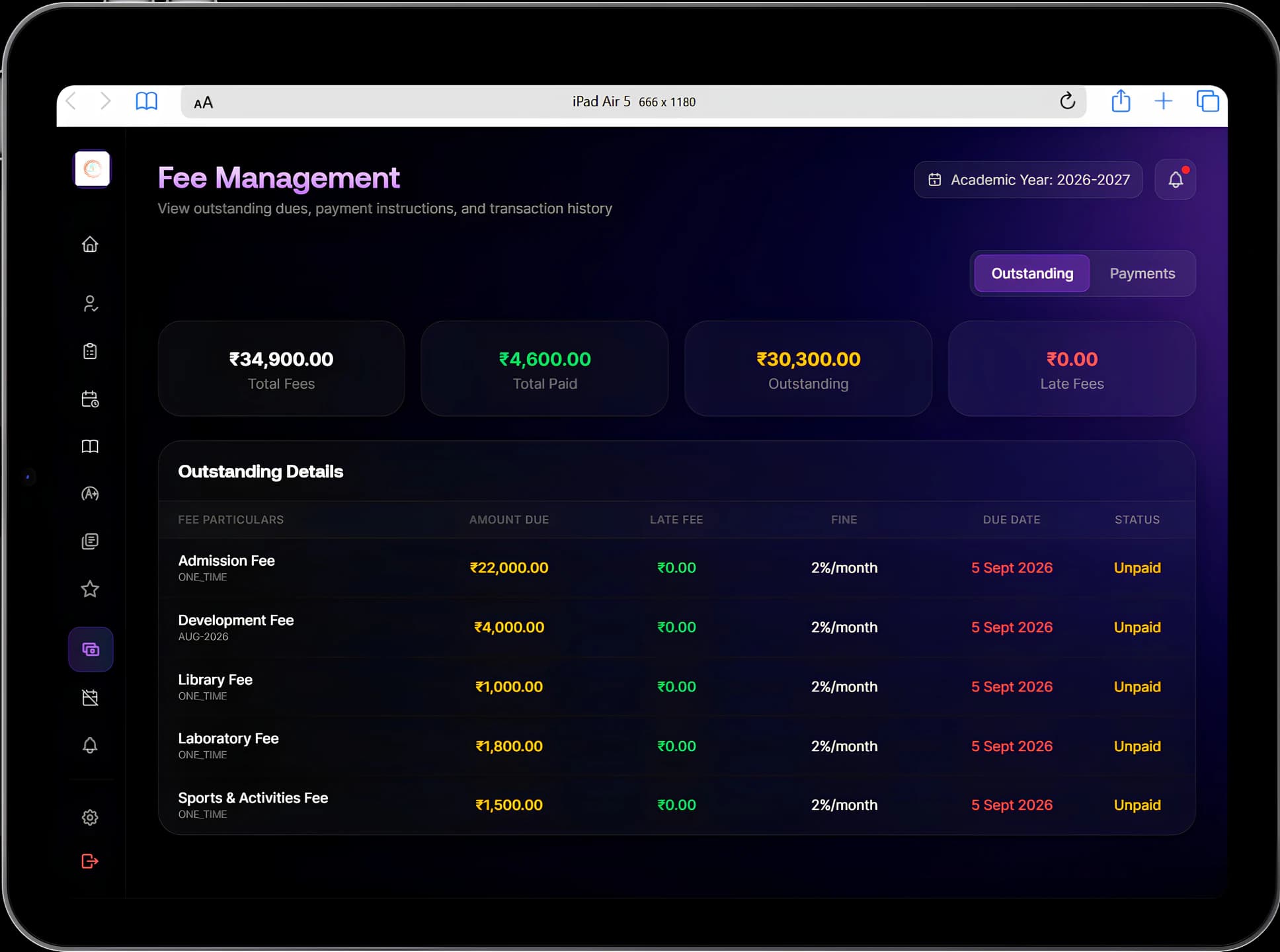
Fee management with total, paid, outstanding and late fees, and outstanding fees listed with amount due, late fee, due date and status

Fee management

Fee management with total, paid, outstanding and late fees, and outstanding fees listed with amount due, late fee, due date and status
Fee management with total, paid and outstanding fees, and each fee's due date and status.

Student care

The details that matter, with the people responsible.

Health profiles, emergency contacts and medications are on hand when time matters, for class teachers and for the family.

Health records
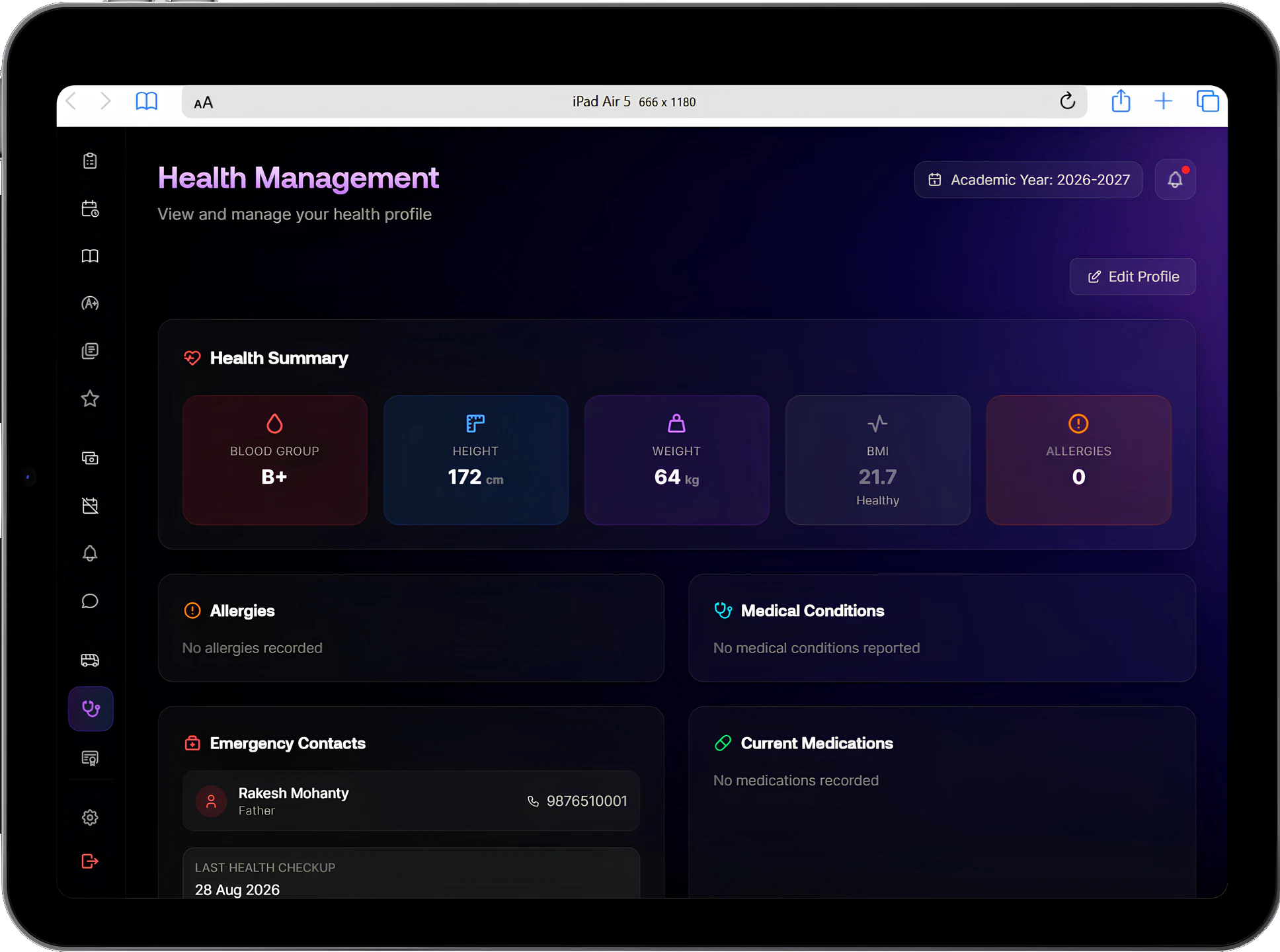
Health profile with blood group, height, weight, BMI and allergy count, plus medical conditions, emergency contacts and current medications

Health profile

Health profile with blood group, height, weight, BMI and allergy count, plus medical conditions, emergency contacts and current medications
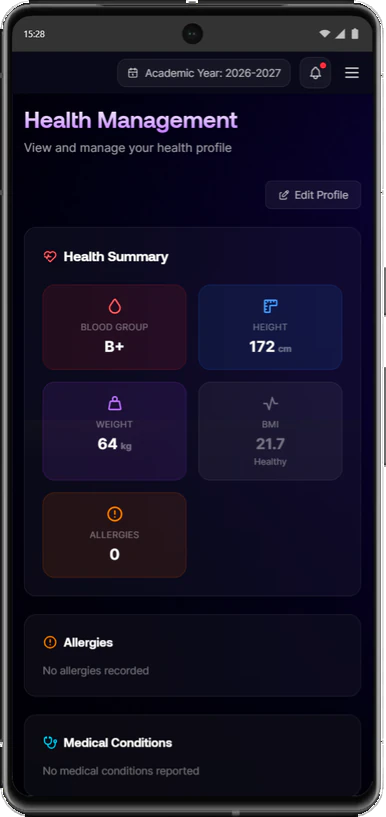
Health summary on a phone with blood group, height, weight, BMI and allergies

Health summary

Health summary on a phone with blood group, height, weight, BMI and allergies
A health profile with emergency contacts and medications, and the health summary on a phone.

Platform principles

Software should follow the institution, not the other way round.

  • One record, many workspaces

    Students, staff, classes and fees are recorded once. Every module and every role works from that same record.

  • Access follows responsibility

    Teachers see their own classes and students, parents see their own child, and leadership sees the institution.

  • Your policies, configured

    Bell schedules, fee structures, grading schemes, attendance rules, leave types and approval chains are set by the institution.

  • Decisions leave a record

    Approvals, corrections, overrides and voided payslips keep who, when and why, so a question months later has an answer.

  • Nothing published by accident

    Results, payslips and closed attendance months are released or locked deliberately, so unfinished work does not reach families or staff.

  • Runs in the browser

    Manecia ERP works on computers, tablets and phones through the web browser. Parents have nothing extra to install.

Implementation

From first conversation to everyday use.

Moving an institution onto new software is part of the product. We stay with your teams from the first workflow review to ongoing support.

  1. Step 1: Discover

    We map your current workflows, roles and records, and the tools your teams use today.

  2. Step 2: Configure

    Academic structure, fee rules, attendance policy, grading, leave types and permissions are set to match your institution.

  3. Step 3: Migrate

    Student, staff, fee and attendance records are brought across and checked for format and completeness.

  4. Step 4: Train

    Administrators, teachers and office staff learn the system through the work they do each day.

  5. Step 5: Launch

    Modules go live in the order that suits your institution, with our team on hand as people start using them.

  6. Step 6: Support

    Ongoing help as your staff, policies and academic years change.

Questions

What institutions ask before choosing an ERP.

Anything else? Write to support@maneciatechnologies.com.

What does Manecia Technologies build?

One connected system for a school's admissions, academics, finance and people. Our flagship product, Manecia ERP, covers admissions, academics, attendance, fees and payroll, staff operations, student care, transport and family communication, with every team working from the same record.

Who is Manecia ERP for?

Schools and other education institutions that want one system for leadership, the office, finance teams, teachers, students and families, with each group seeing what their role needs.

Can we start with selected modules?

Yes. Implementation can start with the workflows that matter most to you and add modules over time. Because every module uses the same records, adding one later does not mean re-entering data.

Can our existing records be migrated?

Yes. Migration is part of implementation. The approach depends on where your records are today, how they are structured and how much history you want to bring across.

Will it follow our own rules?

Fee structures, attendance timings, leave types and approval chains, grading schemes, pass rules and timetable patterns are all configured by the institution.

Does it work on phones?

Yes. Manecia ERP runs in the web browser on phones, tablets and computers, so parents, teachers and staff can use it on the device they already have.

Is there a free trial?

Yes. Institutions can start with a 15-day free trial, and our team helps you set it up.

See Manecia ERP against the way you work.

Tell us how your institution runs today. We will walk you through the parts of Manecia ERP that matter to your teams.